
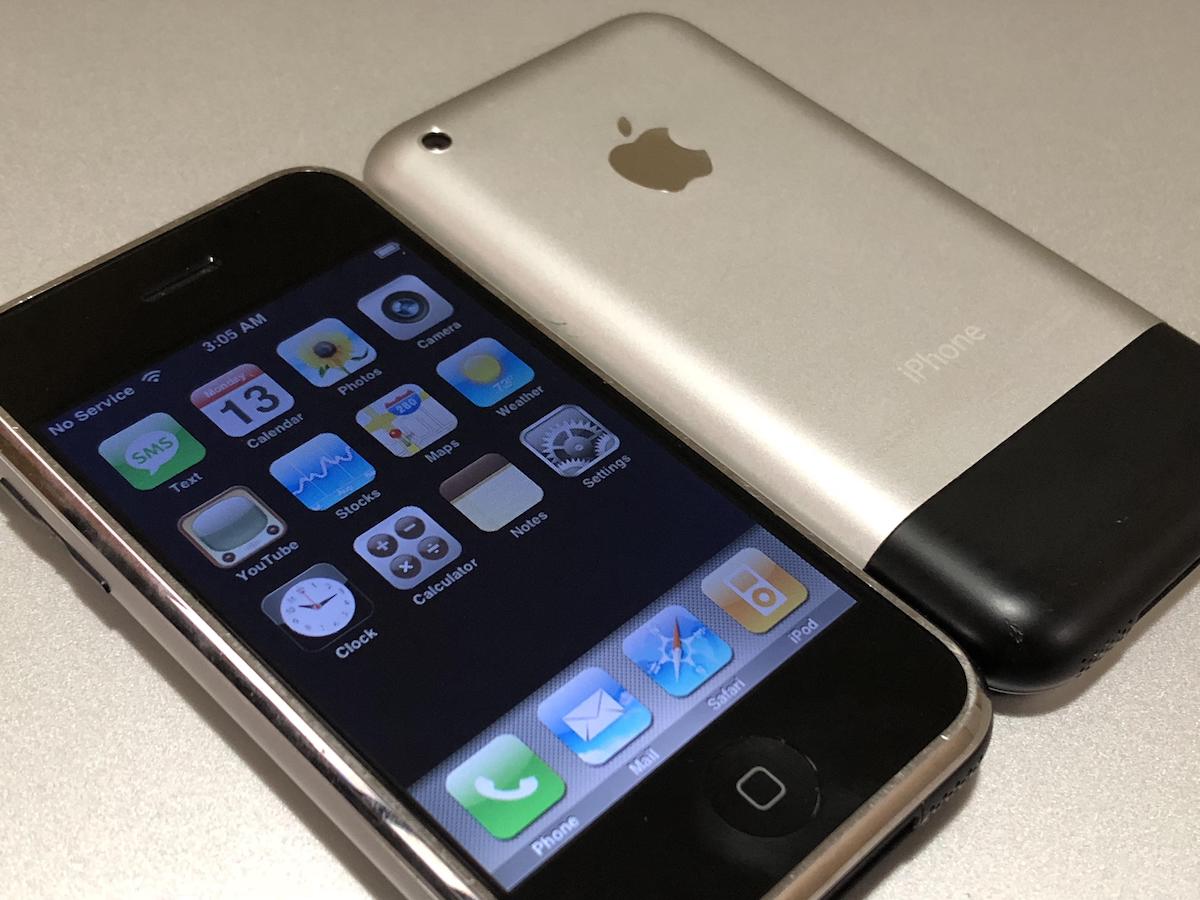

Whether you love or hate Apple, you must admit that the iPhone revolutionized cell phones as we know them today. Before the 1st generation iPhone hit the market, the top selling phone for the past three years was the Motorola RAZR. However, not too long ago, the iPhone and Apple enjoyed monumental achievement by becoming the best selling phone in the third-quarter of 2008. It’s been almost two years since the release of the original iPhone, and only a few months ago Apple released the iPhone 3G. Both phones are still missing some basic features, but there has been an improvement in the latter version. In this article, we will cover the differences between the iPhone 2G (or first generation) iPhone and it’s newer counterpart, the iPhone 3G.
Design and Dimensions
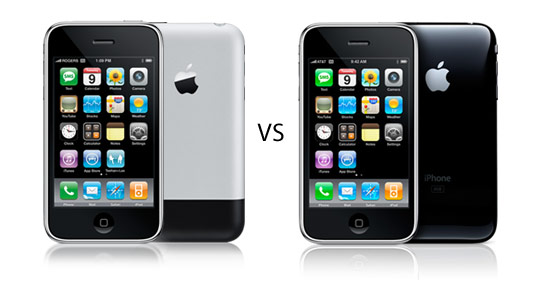
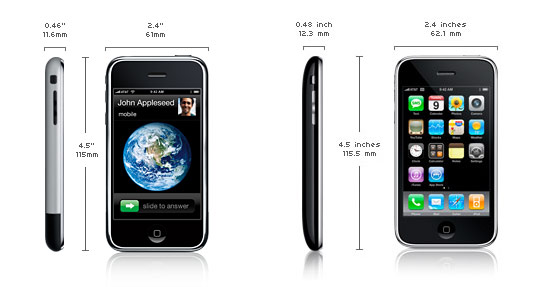
Even though there aren’t too many differences in the exterior of the models, we are going to point them out before we get to the hardware. The screen size is exactly the same at 3.5″ on both models, which provides for an ultra-clear 480×320 screen resolution. The rear of the original iPhone has a smooth metal finish with a black strip at the bottom. The front of it has a shiny metal piece that surrounds the side of the phone and ends behind the screen. The iPhone 3G has a smooth piano black or white finish. It also has the shiny metal piece around the outside of the screen. The iPhone 3G features buttons that are made from a shiny metal, excluding the home button. This gives them a sturdier feel compared to its predecessor. The shape of the 3G phone is a major difference as the original iPhone is a little thicker and completely flat when set down. The 3G has more of a round feel to it that flattens out slightly around the edges. It has been said that the screen of the 3G heats to a warmer temperature than that of the original iPhone.
Features & Technical Specifications
Once we get under the hood, we begin to see where the 3G separates itself from it’s older brother. The iPhone 2G only supported WiFi, GSM, and Bluetooth. This means its speed surfing the Internet were quite limited. The iPhone 3G introduced 3G speeds to Apple’s flagship model, and it also supports WiFi, GSM, and Bluetooth. This makes for a better experience surfing, watching Youtube videos, and downloading data onto the phone from the Internet. The first generation iPhone supported the following frequencies: GSM and Quad-Band (850, 900, 1800, 1900 MHz). The iPhone 3G supports all of those frequencies, but added to the list quite a few more to enable running at 3G speeds, including UMTS/HSDPA (850, 1900, 2100 MHz). The iPhone 3G also supports GPS, which was not included in the original iPhone.
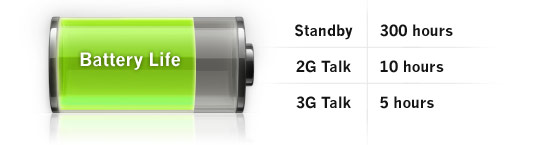
Both phones have a 2MP camera, but do not feature a video recorder. The iPhone 3G weighs 4.7 ounces compared to the 2G’s weight of 4.8 ounces (not a notable difference). The only downside to 3G capabilities is that it eats into battery life. The iPhone 2G beats out the newer version in that regard by providing up to 8 hours of talk-time compared to 5 hours with the 3G.
Bottom Line
Comparing two great phones is always hard, but Apple made a great move by creating the 3G iPhone. The iPhone 2G is impressive, but with the features the 3G provides and the transition with new phones all moving to 3G, it’s a definite requirement if Apple wants to maintain its new status as the #1 selling phone in the US.
This post makes very interesting reading.
Makes me want to get the iPhone now. Ill try get it for free.
Thanks very much 😀
Ainsley
I was really thinking about buying one of these phones, but after reading this I just couldn’t resist! Love my new phone! Thanks!
The first Iphone should have had 3g, it’s useless without it. The only good thing about this phone is the user interface, everything else is closed-source. They recently managed to port Linux to the Iphone 3G, which means we’ll get Android on it soon, and that’s a proper os – it’s open source.
I have the original iPhone, and haven’t upgraded since 3G is not offered in my area. They advertise the phone for its 3G capabilities all over the nation, but the actual service only works in major cities. I’m sure some people have been disappointed after getting the phone home and not being able to get the 3G symbol to show up. 🙂
I am fine with my iPhone 2G. The new 3G looks cool, but considering the battery life, I do not feel like upgrading. Apple has yet to address the basic phone features that are missing. How can they possibly ignore SMS forwarding, copy/paste etc…
Yea, I agree with Matthew and Zeb. I’ve had the iPhone 2G for almost 1 year, and yesterday I received my iPhone 3G. The iPhone 3G is cool, but Apple still didn’t implement copy/paste, SMD Fwd, MMS, and video. What they wanna prove…that they don’t care at all?
I’m another still using the original 2G iPhone. I’ve been contemplating the 3G since its release, especially since my 2G’s been acting funny, oddly, since DAY 1 of the 3G release (my vibe has died and the speaker seems a lot quieter, all this maybe due to age and being dropped a few times). Being that its now December, about halfway to a major revision or close to a minor one (32GB soon?), I’m unsure what to do. I still have my $100 Apple credit from the price drop. I’d surely love the speed difference in the city along with the GPS, but I don’t find those things worth the extra money up front as well as monthly.
What would absolutely get me to upgrade is a tethering option along with more memory and a faster processor, which I feel are necessary. A better camera, option for video, a plastic back that won’t crack would be bonuses along with all the features we should have had since the beginning.
I just got the 3G as an upgrade from my old 2G iPhone. The technology is much faster for the 3G. Although I do agree that some features, like the copy/paste, wide screen typing, and a few other things should be included, I still am happy with my new 3G iPhone.
I’m sure they will include those things in future upgrades…hopefully SOON!
If you unlock/jailbreak either iPhone and use it with T-Mobile, can you download apps from the apps store?
After the release of Nokia N96,5800 XpressMusic the position of Apple Iphone in the market is very bad.So apple is changing their policies and they are planing to update their models.
I’ve got an iphone 2G, bought it about a year ago from e-retailer and using it in australia before iphone officially came to australia. it works very well but m keen to upgrade it to 3G! Does anyone know how can I upgrade iphone 2G to iphone 3G?
i still dont have the iphone but my friend suggested that ill buy iphone 2G since i dont want to spend a lot but im still confuse if ill get the 2G or not? yeah i know 3G is better than 2G but do u think its still good to buy the 2g 1?
Mike, you can still download apps from the app store as long as you login to an iTunes account. I have the iPhone for t-Moblie, and use the app store all the time.
I hav planned to buy to 3g….but it doesn’t support flash player…being a top1 phone It must support…and can’t even download videos….but has a posh look….n all iPhones should hav done with d jailbreak thing so that d people can download applications…and Bluetooth should also b there….
I kant wait 2 get my 3g on friday I have this peac of $..? sidekik slide. If any 1 wants it write bak 2 this
I have the 3G phone and I take the points above, but, I think with the technology behind the 3G phones getting better, I don’t see the need for MMS any more. If you have an iPhone and I have an iPhone, i can take a picture and email it to you, eventually making MMS redundant in my eyes.
I’ll go along with the video capabilities but as a person who has never used a phone for videoing, it’s not really an issue.
The one thing I do miss is copy/paste and SMS forwarding. I suspect those two will be available in a software update sometime this year (2009).
But, to put it bluntly, I LURV my iPhone!
I just want to know how much is the iphone 2G now compare to the iphone 3G
so 2G is better than iphone 3G
In text it’s stated that “the original iPhone is a little thicker” but from the picture it appears to be the opposite.
I’m a little confused about the battery life, since i’m in a real dilemma whether to change to an iPhone 3G from my 2G model or not. Is it that you get five hours of talk time in the 3G model only if you’re using the 3G services or you’d get 5 hours of battery life anyway?
Also, whether the plastic will last as long as the metal in 2G did?
I will let you know one harsh thing. If you have an unlocked version for any GSM, the 2g works more reliable than the 3g. I am going back to the 2g from my 3g due to that fact. I have heard such horror stories on AT&T service, I am not willing to change. But I love my iPhone.
I have heard lately that if you try to unlock the 2g phone and are successful that the potential for it turning into a “brick” is good. Does anyone know how to avoid this from happening?
I’m gonna get an iPhone soon. This article will help me choose which one to get, assuming you can still choose. That being, that the first generation is still being sold or not. I bet I could find one on Ebay or something.
Anyways, nice article.
i have my iphone 3g..and at first i can used the wi-fi but 1 day its just stop connecting and until now i cnt used it..please help me…
well im about to get the iphone 3g an i say it beats the 2g any day {except battery life} but besides that the 3g iphone is just better,well to most people at least.
I have the blackberry pearl I want to buy the Iphone off someone;will I be able to just switch my sim
Card with no problem?
How do you not have a text pop up on the screen of the 2G evrytime you receive a text?
How do I apply one ringtone to every caller on iphone 2G?
Whebn I purchase a ringtone gfrom itunes does it automatically go into my ringtone folder?
2g is difference only 1 compare to 3g (2-1 = 1)
I have an original 2G iphone with 8GB memory still in its original packaging. Does anyone want to buy it? $1000.00
iLike the 2G better, it has a sleeker look to it, iHave no intrest in GPS anyway…..
Note that the 3G is actually thicker than than the 2G, not as stated in your review??
Stil yet to get my 3G, only upgrading due to bigger memory, as the difference to 3G internet roaming is not that different,
About to Know the 2g iphone.If I want to use the phone in Bangladesh, The What can i do.Pls inform me about this,
I still have the original 2g iphone and am very please with it. Some of my friends have gone 3g but I still don’t see much difference. Most of the apps work fine on mine. I understand that some of the new features will not work on the 2g with the new software release coming in April but it will not be a big of a deal. On my blog site I have an icon where you can go and find lots and lots of accessories for the iphone and all other phones as well for a very low cost. Check it out.
i need help deciding which phone generation i should get…it would be a bummer if after spending all that money i choose the wrong one. And where can i buy unlocked/jailbreak iphones? Does everything in the iphone work normal if i use it with another company like t mobile or other?
thanks for your help!!
i need help deciding which phone generation i should get…it would be a bummer if after spending all that money i choose the wrong one. And where can i buy unlocked/jailbreak iphones? Does everything in the iphone work normal if i use it with another company like t mobile or other?
thanks for your help!!
I just saw both units and one of the important feature in 2G is the “Installer” wherein 3G is not included. The installer in 2G provide automatic list of upgraded files or games and ready for download and installation.
Yeh..just bought a 16gb 2g..iHacked and running T-Mobile PREPAID. I love it…no need for the ball and chain AT&T. Full access to iTunes etc. Why Get a Plastic and Glass iPhone all for what? 3G (which by default ..you end up paying for hence the AT&T Data Plan.). Oh don’t worry bout the updates…that gets hacked in time. Besides..most apps run smooth on the 2.2.1 anyways. XD.
I have had my iPhone 1st Generation for nearly two years. I like the fact that Apple decides to upgrade software every opportunity possible. As Apple fans, we should know that Apple has a new release for something every twenty minutes. I believe we were all disappointed that the original iPhone didn’t come with Video, zoom, or MMS compatibility. As of March 17, 2009, Apple has released the 3.0 Software update. Coming with the update will be landscape additions, search bar in all major applications, MMS, single-multi delete text messages, forwarding texts, cut copy paste, Spotlight. . So on with over 100 new additions to the iPhone. Only iPhone 3G users may gain access to MMS, due to hardware changes between iPhone 3G and his older brother. There is no specific release date on the update, but “This Summer” seems to be the key word. 🙂
Can I get an ulocked iphone 3g that wil work on T-mobile, and if so, where….??
Guyz i really wonder if wot am experiencing with my 2G iphone is true or that i dont knw how the syncing function workz very well. please help me out, i synced my musice form one of my laptop i later connect my iphone to my other laptop only to be propt with a meesage box that i can only sync from one library that if i wnat to sync music from my 2nd laptop i’d ve to say goodbye to all the songs nd data that i synced from the 1st laptop. Could u help plz?
Wanting an iphone3G but not sure yet..can you use the bluetooth to actually send songs, piccs etc?
mate said you carnt but want to be sure!
Hi guys,
I have an unlock 2G and i can’t creat ringtone and it has no apps on my iphone ;( anybody know how to creat ring tone download game and put the apps on my iphone please,,,,Thanx
I use a blackberry for the eails through microsoft outlook. Can anyone tell me if the Iphone 2G will push emails to me
how about its memories?? internal whatever,..
I am about to by the 1st generation iPhone from a friend of mine. I am with AT&T. Do I just insert my sim card and add the internet to my account, or is there something special I have to do like go in to a AT&T or Apple store to do whatever in order to get everything to work properly.
ahhhh iphone doesnt contain copy,paste,fwd even video recorder than wats the use of havin i-phone its better to hav sony ericcson atleast if u go to a party there u want to record a video that u just need to show a apple marked phone which is of 24ooo its waste of money…one more thing the bluetooth of i-phone doesnt connect to other phones than its waste its sure waste
can you unlock/jailbreak either iphone with alltel? must you use itunes with the iphone? or will rhapsody recognize the iphone?
how will the i phone work with old suncom members (now t-moblie) how do i get the internet with out spinding alot of money on internet i now have the old total internet from suncom will that work for the i phone
Can unlocked iphone be used on Vodafone network in any country?
I rekon mybe the 3g is better i have 1 and its good but yea the batterie die but theres charger cases
i got the iphone 2G i reluctantly brought it as i did not have enough money for the 3G (im 13 by the way!) all my mates told me that 3G is way better then my mum gave me some more cash so i could upgrade BUT i still dont think there is such a big difference but there is a difference in price so if you are like me money short i think you should by the 2G as there is HARDLY any difference 3G just looks better has faster wi-fi connection and a few more compatible apps buts thats about it! thank you for reading!! xx
i wanted to buy iphone 2g ,what does it cost ? can i get it at home dilavery
I lost my 2g iphone. Is there a way to get another 2g for a reasonable price and where? Is there a way for the phone company to track my old phone? Is there going to be an up graded 3G phone coming out soon?
I love much my iPhone 3G
WELL I HAVE THE 2G AND I THINK IT REALLY DOSENT MATTER IF YOU HAVE THE 3G OR THE 2G THEY BOTH ALMOST LOOK THE SAME AND THEY BOTH DO THE SAME THINGALL IPHONES ARE COOL AND IF YOU HAVE ONE YOUR COOL SO………
I’m planning to buy an iPhone 2G only since I really don’t enjoy using the 3G features of a mobile phone. But I’m not buying it now, maybe on the second half of this year since I also expect a continuous drop in pricing on the market for the next few months.
should i get an iphone 2g, or a nokia e63?
Hiya, want to buy an IPhone for my daughter, and i can get the 2G £100 cheaper than i can the 3G is it alot more worth the money? Dont know what to do wondering if anybody could tell me if the 3G is worth so much more?
I am thinking of buying an iphone but I dont know what version to get 2G or 3G?
ok i can’t decide to get the 2g or the 3g because i hate how the 3g one looks, i love the 2g one how it’s thicker and more flat…and basically all i do is text and listen to the music, so i don’t know which to get!!
is there ant really difference bettween the the new and old iphone? i am getting one but am debating. what is your opinion?
After reading the email from Apple indicating there is “iPhone OS3 Software Update” I was interested in the new “Internet Tethering over USB” as mentioned in the email.
After installing the update I could not find anything about setting the Tethering connection,
the email mentions it is a software update to OS 3, but they also indicate with a (*) that this feature is only available on iPhone 3G and iPhone 3G S.
Hence my question is; to make the Thethering work, can I do it with the ‘old’ iPhone with a “3G” connection, or it can only work with the new iPhone (which happen to have the same name as the connection)?
k;’
3g is sooo much better
I am trying to connect the ipod generation 2 with the bluetooth speakers. Somewhat, it failed.
am using iphone 2g can any body tell me regarding forward msg…………….should i need to it r any other option for it …..
Well, I read the comparisons between the iphones and i think that the iphone 3g just has a more stylish back. I been using the iphone 2g and it works just fine for me, but i do not like the facts the iphones cant bluetooth stuff. I am also aware that Apple just released the new iphone 3gS, and im thinking about giving it a shot. But i am very satisfied with my iphone 2g.
Sir I have An apple Iphone 2G And the is not been Detected at Itunes in My PC the OS is failed to boot so i need to reinstaall in can u guide me to reinstall the OS and Know me procudure
please let me know how i can get the Version 2.0 for iphone 2G for windows
Does they reduced the cost now? I heard that the cost of iPhone is $100. Is it true? Latest Technology Information
Hey guys with the apple 3G price slashed i am planning to get one thro’ my cousin from USA.Will it work in India and whether the software should be cracked in US or here in India.Is Apple selling the 2 G model yet,i am not a big feature freak though
This is a very cool device and it’s very easy to use.
hie i live in new delhi, i have iphone 2g , 8gb.. i am using it from past 1 year .. but now i want to sell it …….
any one interested …
can contact :-9999669726
Hey, btw, the iphone 3g can also talk with 2g, providing up to 10-12 hours of talk time.
well theres is a drawback with jailbroken/unlock iphone, u can download apps all u want but once the app requires an update and requires the iphone updated to most recent firmware which is 3.0, your iphone will be back to factory state. so do not update your iphone.
Juanita, do you have the old 2G iphone 1st generation too, because I want to download app from the bible.
Oh Juanita, I forgot I have t-mobile GSM service too.
I am expecting a iPhone 3G pretty soon, I just want to have more of a veriety of Phones but I liked the iPhone 2G More because of it’s Sleek Metal design on the back of the original iPhone & I also don’t like the fact that the battery life has been shorten on the iPhone 3G!
He says that the original iPhone is thicker when the specs say that the 3g is a bulkier phone
Juanita how do you have an iPhone with T-mobile. Are you outside the US? Thanks
I want to buy an iphone but i dont know which one is better 2g or 3g?
HI I LIVE IN COLOMBIA AND I WOULD LIKE TO BUY AN IPHONE,I AM NOT SURE TO BUY THE IPHONE 2G OR THE 3G OR WHAT I DONT KNOW.I WISH SOMEONE WHO HAD ALREADY THIS TYPES OF IPHONE WOULD SAY ME IF IT IS BETTER BUYING A IPHONE 2G OR A IPHONE 3 G
im hapy wid mah 2g……..cz d 3g is more abt showing off
Melissa–
Definately buy a #g if you live outside the USA as the 3g supports global access MUCH better.
buy a 3G, with no doubt.
Sardor and Melissa, as I know so far iPhone 2G it’s better than iPhone 3G, but both are perfect!
iPhone 2G as you can see “up up up scroll up up up” battery’s life beats iPhone 3G.
I have an iPhone 2G which I bought in Cyprus 300EUR (maybe too much for you) and am completely fine and always on updates.
Take care all!
The iPhone 3g looks and fell better but you can switch from 3g or edge from the phone. My battery holds a charge pretty good so far. Only when I turn the edge on though. The 3g is pretty fast though. And when share my iPhone 3g connection with my computer I downloaded a 80 mb download it did it in nines minutes. Pretty fast
there is nothing great with 3g or 3gs.everything is available with 2g. i am using it its is the same as the 3g.i phone 2g is working fine in india.
hi i live in nepal and i i like 2g iphone i don’t no which one is good
Well Melissa, I would suggest the 2G iphone, you can then upgrade and add any additional application you wish using itunes store. If you want one, please let me know. I have first gen 8GB, 3G 16GB, and 3g 8G, and 3Gs. let me know if anything. Thanks
I want this phone too. I think 3g is better.
3g is a cool design coz that all r black colour…by the way i has a 2g n look great n good condition…heeee
i just bought an iphone 3gS and i already like it a lot more than iphone 2g! i never had the regular 3g but i really like my new phone!!! it has a lot of more stuff than any other iphone mad so far! i heard they are making a iphone 4g in like 2 years!
i have the 2g iphone and the battery life stinks it goes down to fast
i have got a i-phone 2g d phone is good n i have cracked d phone can anyone tel me have i done a good thing n d battery life sucks one game and the phone becomes so damm hot …….. some pls help me out
i jst bought an iphone 2g and as it works with virgine mobile i can’t set up internet. i’v got all details bt it seems to not workin or i just can’t do it properly. any advice? plz email me. thanks
i like 2g iphones very much y you have stop 2g iphones in brahin
Hello friend, where can i get a new unlocked apple iphone 2g in india. And incase after buying if i have and problem in the i phone where can i be able to service or repair my iphone. since i have bought an unlocked handset i would not able to service with apple authorized service center. so does anyone know , where to service the phone……
I’m leaving this comment on safari on my 2g iPhone, the speeds of the 2g are ok but the 3gs is the fastest. iPhone 2g is allmost exactly the same as the 3g and the 2g is thinner
I HAVE AN ORIGINAL 2G IPHONE ,BUT IM NOT HAVING THE SIGNAL IN CLOSED PLACES GIVE ME A SOLUTION
Hi, Im not sure which iPhone to buy.
2G or the 3G.
I like the 2G as it is more stable, and I can get it upgraded to be just like the 3g s
BUT, The 3G has a GPS and looks slightly nicer and has 3G.
hi, i have a apple 2g. i had purchased 15 mth back. i donot have the cd . which website can i download.
nisha
i just got an ipone 2 g nd the ipod part of the phone wnt work. i plug it into my computer and it dosnt say nothing. as if i did plug anythng but a camera
Hey frnds ,
I need to buy apple i phone.
So, can any buddy tell me the difference between 2g & 3g i phone .except its 3rd generation software.
Which one will be better if i dont have any requirement of 3g but i want all the features of i phone.
Hello, I am about to become the owner of an Iphone 2g. I will want to install TomTom on it – if I can! I have this on disc which I may be able to load onto my PC.
But can you advise how I may go about installing this (or for that matter) any program on the Iphone?
Thank you, in advance!
how much is iphone 3G? and can iphone 2G access internet without WiFi?
Well go for the 2g, as its Battery life is Twice as Good as 3g, and now theres lots of free WIFI hotspots around, who needs 3g for internet. You can now record Video & share Files via bluetooth, when you jailbreak your iphone.
I have had both the 2g and 3g. I would recommend the 2g seeing as to how it basically has the same features that the 3g has minus the “3g” service. When i had the 3g i could hardly find a 3g network. Cost is another thing, the 2g is 20 dollars and you get 200 free text and the 3g is 30 dollars and no text. To get a good battery life on 3g is to turn off all the features that make the 3g “special” and you are back to the 2g with a different body. I am now back to the 2g and glad.
Hi, Melissa you should buy the new i phone 3gs if you are not worried about the money, it costs more but has a lot of new things with it, it is a lot faster. If money is a bid deal just get the old 2g off eBay for around $100-$150 it is a lot cheaper if you want to jail break it and unlock it, because if you get the new i phone 3gs from ATNT, you have to get a 2year contract.
My iphone is a 2G one.. Where can i find the WIFI function??
Totally cant find it anywhere in the phone..
Melissa I think you should move with the times, go for the iphone 3Gs. The future is here.
3G is more stylish, elegant and better in design than 2G but 2G is better when it comes to battery life
both of them are cool but both of them will soon be ignored when another iPhone would come out , perhaps, the iPhone 3rd generation. 🙂
Me the only online PSP go wall paper creator feels 3G is better than 2G by all means , but it does not standout with other phones in terms of copy / pasting , MMS, and many minor things, which kinda slows down the work of a normal mobile user.
I wanna buy an iPhone 2g. Does nebodyknow wherebi can get one cheap less than 200, besides eBay????
I bought an i phone but am not sure whether its original or duplicate. Any idea how to check it out. The phone was not brought from India but bangkok and I have paid 32,000 IRS for the same. Any advice.
how mutch does it cost?
can anyone sell me an iphone 2g? for 150?
there is no battery backup..otherwise da phone is gud..do something bout da battery
i want an iphone 2g for tmobile unlocked, does anybody know where i can buy one besides ebay and craigslist, etc?
Almost every cell phone out there comes with a video recorder the iphone 2g or l3g should of had that features already. Apple is just pick pocketing, why not , when they make more money that way. I REALLY like the iphone and its capabilities to do things. Just remember we the consumer that is making what Apple want to do. Again I love the iphone but without the basic features camera,video, picture text… I will NEVER bank form me.
They as APPLE will never bank from me…
The Economist told that in Africa is starting new application for mobile phones. That is making payments by phone via SMS, where there is no banking services. In Kenya there is 9,5 million users of this “African Mobile Banking.” Then this could give Apple a good chance to utilize its iPhone2G. Then all the world would have a chance to buy and use Apple phones.
WHAT is the name of that phone that is like the iphone but a different generation? its smaller that the iphone
the negative side of 3g is you cannot downgrade the version. if the programs corrupt its hard to fix.
The 3g Iphone is cool and lovely but i wonder if it has functions like video call.
Pls i need somebody to educate me because i just got mine but i can figure out where the function for video cal is.
I have just bought the 2g and am completely happy with it, i only use it on a wi-fi connection and it is quick enough so i think for now i’ll save £150 in my pocket and stay with the 2g….
i just got my Ipone 2G.. but, in my country, in Indonesia, its really difficult to get 2G accessories..
i wanna ask where i can get those many things of accessories??… thnx..
were can i buy a 2g for under 150$
I am not an iPhone user yet but evern though the 3gs is out I’ve always like the iphone2g best
hey, i’ve a 2g iphone. since its the first gen , i’m unable to use many apps. so i was wondering if there’s anything i can do about??
i think 3G is better than 2G
i’ve been using an apple iphonne 2G since the last 2 years n i say that the phone is the best in every aspect
its fine to even spend 50000 for an iphone (any model….may it b 2G,3G,3GS)
I have 2GS.Its bluetooth device is not working neither bluetooth.Can you advice me regarding its settings.The only option available in settings is on and off or 2nd one discoverable.
Would anyone like to sell their old 2G for a good price?
Apple 2G phone on offer in South Africa, for +/- R6,000.00 less than a new 3G iPhone.
Guess price tells us if it’s used as a phone and music device only, then who need’s 3G??
Surf the net with your computer, larger screen, fast connection, and better priced.
2 mega pixel camera will only give you images that can be used on your phone or PDA. They don’t print well, so that feature on the iPhone is not a seller.”htc” has the HD2 with a 5 megapixel camera. You have to be an “Apple” purest to buy an iPhone not for it’s features as a “smart” phone, but for it’s design and ability to sinc with all Apple Mac computers.
bad it is waste of money
i have the 2G and i used to have a Palm but i still understand why Apple wouldnt allow Picture sedning and to take videos. Is that an update i need to recieve? or does it have to be the 3g or 3gs?
is the iphone with model number mb213b/a the ist generation iphone 2g?
Im still a 2g man but, I have still looked at the 3g and 3gS. How can I ignore SMS forwarding,copy paste etc……… I asked a friend with 3g iPhone to trade phones for a week its not much a difference why buy a new phone because its a little faster? Just get 2g and youll be perfectly fine.
have had the iphone 2g for a year and a half and not bothered about getting the 3g because of the disapointing battery life and there are not much difference between the 2 of the iphones apart from the speed and the scientific calculator how sad is that. and thats why people are spending so much extra just for them things.
If i were you i would definalty stay with the 2g and if you prefer the look of the 3g you can get a case that goes on the back of your 2g that looks like the cheap tacky plastic on the back of the 3g. i hope you take my advice 🙂
Hi,
iam using Apple IPhone 2G From past 10months. Actually the model was good but i WISH SOMEONE WHO HAD ALREADY using THIS TYPES OF IPHONE WOULD SAY ME , how to increase the life of battery & which way of charging will be better , whether by USB or by electric charge because i kept charging twice or thrice in a day.
heyy Hey I Am getting An Iphone 3GS Im Sure That THat One Is better Than The IPhone 2G And The IPhone 3G Soo Pahahah Get The 3GS Ahahah XX
i just broke my 3g, its not the new 3g s. i want a new one but i got to work for it what should i do???
Iphone 3g is simply best…..but people with low budget can buy 2g ….this post Compared both 2g and 3g very well……..
I have all three…. iPhone 2G, iPhone 3G, and iPhone 3GS
I have to say that the iPhone 2G’s screen was the best of all three….. it just pops the icons out of the screen like it’s right there
The 3G and 3GS’s design is and still is awesome…. the 2G is great too
Hi, i am Alex and i live in New Jersey. I am 10. I would like a iphone but i do not know which one.2g or 3g.i think i will go with 2g.
is there a big difference on internet speeds?
luk everyone!
iphone wat a waste of money! get an mp3 And ordinary phone for 100euro!!! AMAZING!
Well I have a iPhone 2g but I want a 3g so should I get one cuz idk if it’s better not or not cuz I want more battery life and a fast web and better speakers?
I thought I’d add my two pennies. I’ve recently got hold of a second hand iPhone 2G, and personally think that it’s better than the 3G. Once I got OS 3.1.2 installed on the phone, it matches my neighbour’s 3G to exactly what hers can do! I don’t use the GSM internet on it, only ever use WiFi. So personally, I believe that if you want to get an iPhone, take a think about what you will use it for. If you don’t need the 3G capabilities, get a 2G!
can you use a pay as you go sim card in a iphone 2g or 3g?
I have just upgraded my iPhone and my messages are now being deleted automatically.
Does anyone know why this is happening and what i can do to stop t from happening because it is frustrating.
Thanks.
Hi I’m about to get my iphone and would like to know how I could download nice apps. in the most friendly way in other words (downloads for dummies)
Thnx
Yo mr. Colombia….don’t buy the iPhone. my roommate was Colombian and he could not afford it.
can someone give an iphone 2g hehehe
Melissa, colombians don’t care about phones – they only care about drugs. money and violence!!!!
For me, iphone 2g is the best……..
Hi, I have an iPod touch 3rd gen and am in the process of aquiring an iPhone 2G… Has anyone got any tips of things to look for in an iPhone? Also if anyone can tell me what they think of the 2G from personal experience I would be highly grateful, thanks ipodtouchowner
Anyone know If I buy an unlocked Iphone if I can use for verizon? If so can I buy apps at itunes like tmobile…..thank you.
Anyone know If I buy an unlocked Iphone if I can use for verizon? If so can I buy apps at itunes like tmobile…..thank you. oh also is the copy/paste wide screen typing included with the ist generation. Sorry if the question is silly Im so illiterate when it comes to this stuff, I’m a busy mom and want to make my life easier, also does gps come with either generation? thanks….:)
if me,i prefer iphone 2G,look..the 3g screen was get some yellow and brown colour..the 2g better,2g colour is totally FRESH..try to compare it ..when u’re ready to buy IPhone..
nokia 5530 or iphone 2g 8 gb?
iphone 3gs is the best obviously it’s the latest version
I am currently using iPhone 3G and quite satisfied with it. Although an upgrade is tempting but the thought 3Gs battery life puts me off. So I’ll probably just stick to my old but reliable iPhone 3G.
Hi. My wife handed her 2G iphone since she got herself a 3G iphone. That would have been cool being able to use same phone models. Unfortunately, the 2G could not establish a wifi connection here in the philippines. Probably because it needs the t-mobile sim or account. I had visited technicians and opted to downgrade the system from 3.1 to an older version, still to my dismay…the problem could not be solve.
Thus i could only use 2G iphone less its wifi functions. Sad but true
i have an iphon 2g and 3g and 3gs and thay are all cool but i have to say that the iphone 2g is the best of them all but it could do with a bit of the thickness i really like the all and i am selling the 3g and 3gs in ebay but they have only been used for a hour and they bot £250 each
plz sumone tll me hw to gt my games on my iphone plz
hiiii…i bought an iphone 2g in 2009 n nw i m facing lots of problems with it…i got the whole screen changed but still after a month its not working..pls. help me out with it…..i have already spent as much amount as i had bought it for…..
Hi im ryan but i dont know witch one 2 buy iphone 2g or iphone 3g i might get the 2g because it has the copy&paste will someone tell me witch one soon because my brithday is in 3 months
Confused a little, I ordered a case from Tribeca for my Iphone 2G and it doesn’t fit. The package says that the cover is for a 3G (S) and in looking at the dimensions of the phones I really don’t understand why it doesn’t fit???
Anyone have any suggestions?? I really want this case Go Cats!!
Or am I going to have to upgrade my phone?
Thanks
well its how u look at it reli if u take into consideration that 3g has new features u also have to look at the major cost difference i personally prefer the 3g because i love exciting fones but its the same as the 2g basically i hope this helps little too late tho hehe
I have the iPhone 2g and it is unlocked because I have T-Mobie. My dad has the 3g and is also unlocked. For some reason his video loading is way faster than mine so when I try to watch porn when I am lonely at night I have to wait about an hour so I can watch the whole thing without buffer so by the time the video is loaded I have gone completely limp and the mood is gone. I advise those who want an iPhone to get the 3g.
i have 2g i phone .but it lose him program.and its not work steel. what can i do ?
how can i reset my iphone2g when its disabled iam not having pc please anybody helpme
i am fine with my 2g and it has d option of forwarding sms..vedio recording.
i am satisfied wid it and i dont want 3g..
The jump to the 3G model was the best chance Apple had to integrate ‘proper’ multithreading into their phone & add a decent camera (2MP was/is a joke really).
However they gave that a miss. The GPS on 3G, called the compass, yes is a real treat to work on. Guess Apple can be forgiven for being just plain lazy.
I love the 2g considering that Made it since I am John Appleseed
i love the iphone 2g because its cheaper and exactly the same once updated so dont your money on a 3g and 3gs and i unlocked my phone so dont get fooled by apple.
i decide purchase in 2 G i phone but problem is i am to fun forward to sms in friend list and others link number is that option in i phone to send group list and other features please any idea to explain me so i buy 2G thanks
hi im johnnie i would like to by an i phone but for this moment i dont knwo if i buy 2g or 3g
hi im johnnie i would like to by an i phone but for this moment i dont knwo if i buy 2g or 3g but i prefer to buy 2g and put a softwar of 3g
I personally think the Iphone 3g is better considering it runs faster ,and is coller looking . But for those who already have the Iphone 2g , I think you should just keep that one because 3g is not much better .
I have the iphone 2G and I am perfectly fine with what I have. it gets the job done @ a reasonable amount of time. I know I know, the 3G has a couple(2) seconds faster browser than the 2G. and i use the browser all the time and i still love. even the 3GS, the difference is faster web, Yes. Video, Yes, Compass, Yes and that’s all I see. I still love my 2G just the way it is. IM not upgrading, I have my Upgrade already. The 2G meets my preference of a phone. I don’t even use video recording on phones. and besides I don’t get 3G from my house and the main place I use my phone is in the house. how do i know I don’t get 3G in the house? because i have friends who have the 3GS and don’t get it here in the house and other public locations.
Its the same thing to me, there’s not that much of a difference!
I have the iphone 2G and I am perfectly fine with what I have. it gets the job done @ a reasonable amount of time. I know I know, the 3G has a couple(2) seconds faster browser than the 2G. and i use the browser all the time and i still love it. even the 3GS, the difference is faster web, Yes. Video, Yes, Compass, Yes and that’s all I see. I still love my 2G just the way it is. IM not upgrading, I have my Upgrade already. The 2G meets my preference of a phone. I don’t even use video recording on phones. and besides I don’t get 3G from my house and the main place I use my phone is in the house. how do i know I don’t get 3G in the house? because i have friends who have the 3GS and don’t get it here in the house and other public locations.
i have both, the 2g and the 3g……..blackberry bold is the best
MELISSA just dont buy any of the two so you wont have any problem….simple as that gurl…
can i use sprint wit the iphone
i have 2 G i phone ,i did re setting it take an hour but i wait till 3 hrs but it not open it came apple sign in front of screen ,some time it show busy also ,so what sell i do.
THEY BOTH ROCK!!!!
I have an iPhone 3g and its the best thing to ever happen to me. I named my iPhone Helen she is awesome I do not have 3g were I live but who cares every body has wifi.
HI my Iphone is good for good old for old. My hearing impared so my iphone not very good. But 2G 3G what ever technology hanji is much better
Yeah i will get the 2G and i think all iPhone are cool !! BUT I’M PEACE ! And I’m french excuse me for my english !
i phine 2 G rockz but i has limmited features
i like the 1st generation
hi my name is Tyler I live in kingman az and I wan to buy an iPhone and use it for tmobile but I don’t know where to get a good deal on one i would like to get the 2g cuz I love the features on it. Can you tell me where I can get a good deal?
when i first got my iPhone 2G it was so awsome until i started using 3G :p 2G seems to be too old fashioned and slow as compared to newer models.
I have iphone 2g i think its beter behind 3g
okay, does the iphone 2g have 3g capabilities? meaning you get internet not only in your house, but most everywhere?
hi friends plz plz plz suggest me whose battery backup is gud and which is best for browsing and download among 2g and 3g i phone not 3gs…bcz iam going to buy a 2nd hand iphone and that shop having only 2g and 3g iphone……..plz friend plz suggest me…..
how can i replace my iphone lcd,?:D
IS THAT POSSIBLE TO CHANGE LCD OF IPHONE 2G 😛
I like the iPhone so much.
Still I am using a 2G, but as soon as I could I wil change that to 3GS.
Thanks
I have yet to get an I phone, but I am soon going to get one probably. I don’t know ifi am getting the 2 g or the 3 g? They both sound nce. Help?
my uncle has both he says 3g
Well i only think upgrade is good when u need the 3G technology if u dont use it as me so its not worth the money spending since the speed processor, features, size are all the same. So if u spend money today buying this new version, soon apple will release a new version with all the updates already mentioned here that are needed leading u do upgrade once again and then they earn money once again. lol
where in pittsburg i can find iphone 2g???
I have the first iphone. it does not have an app store ? i got it off my friend and i really want apps but i do not have an app store ? even when i plug my iphone 2g into itunes it doesnt come up with an applications tab ! do any other iPhone 2g holders not have an app store ? thanks
Please help me! My Iphone wont turn on. You hold down the top button as normal and the silver apple comes on the screen like it does to turn no but then after a while it just goes black and turns off for no reason. I have tried to reset it and put it on charger but it does the same thing, just turns off. PLEASE HELP!! does anyone know whats happened or what to do???
Thanx! x
my i phone didnot working when i am attached the computer he is still restart mode
I saw the new iphone 4G. IT WAS SO COOL!
where will i be able to buy and 1st egn or 2 nd gen iphone becuase iw oudl like one
300 hours standby my arse!
My iphone has been locked after down load sofeware 3.13 from itunes. How to unlock???
do u have to have internet access om the 2g to dowload apps if so how much is it
Hi i live in philippne , the battery life of my 2G phone is 2 hours longer . I dont were i can buy for replacement of my Iphone battery any can tell w/ me.
I have 2g iphone . when i connect it to PC for transfer of ipod songs it goes to camera connection. i do not have any software cd for apple 2g iphone.
Please guide me.
The iPhone 2G and 3G both have copy/paste, i have both and the feature works fine on both
iphone 4 is here man
hay im on virgin for my phone and i wonna get an iphone 2gs but i cant find any that are unblocked for virgin simcard … any help
have 2g been heating up on its own lately while am not doing anything with it, which is draining thebattery afta a few hrs anybody with an idea what it is?
melissa jus get iphone 4 lol its awesome!!
i love iPhones and i wod like to know which is beter?
Hi,
I did not agree with you aboute the battery life, because you do not distinguish between talking with 3Gor 2G 🙂
” The iPhone 3G also features a battery with longer lifespan than that in the iPhone 2G. You can talk for 10 hours using 2G (8 hours in iPhone 2G) or 5 hours with 3G, whereas the standby has also been enhanced to 300 hours as compared to 250 hours in the iPhone 2G “
i have an old 2g iphone.to upgrade to 3g,do i have to change the physical phone itself or can i do it over the web?
i love my iphone 2g because its the best iphone theyve ever made
i think its a best design and comparision is awsome.
I am agree that the iphone 3G has more features that 2G. And the price is higher than 2G. We have just to pay more for technology.
hey i just bought a 2g off of ebay , honeslty between the 2 -3 -3s-4 i sill thing the 2 is the best….
i Phone 3GS is good the i Phone 3GS with ios 4 is as good as the i Phone 4. The 4 is just awesome
And regards to sardor he should get the i Phone 4 or 3 AKa: 3GS. I’ve had the i Phone 2AKA: 3G if you Wana chose between the i Phone 2(3G) or the original 1(2g) the thing that makes the i Phone great is the 3G so get that turn the stuff you don’t need off and the battery will last long
my mum is buying me an iphone for christmas this year and i was wondering what is the best iphone to buy 2g or 3g i like using apps and going on the internet a bit but i also need longer battery life, could anyone email me the best iphone to get and a reason please
thanks
Dan
I have lost my iPhone 2G in Clifton, Karachi… I am naturally upset coz loosing all my contacts and other data. It was gifted by my brother-in-law from UK and I used it for a week only, during this period I couldn’t noticed the serial no. of the device. I have no complaint with anybody but pray to Almighty Allah that He bless our country with right leadership, security, justice, prosperity and peace of mind… Aamin.
i think theres something wrong with my iphone2g. how will i know if it is charging? sometimes it charge fast but sometimes it does not even if it it charge for 2 days.
it is better if you buy an iphone 3gs. i am 14 years old and i know a lot about apple products specially iphones. i have an iphone 3gs and an ipad
do u all know the new os(operating system) of iphone 4g is available in 3gs. it is way cool my phone has just now been jailbroken and i can download lots of cool apps and i am from the maldives and my dad sell iphones in the maldives he orders iphone from ebay
i think the iphone 2g is better
hey does anyone know whats wrong with hte apple store caise i keep trying to download stuff and it says theres an error with the apple store
i have a 2g iphone its pretty cool i just need to know if its possible to up date the software to 4.0 or better with out locking the phone back if its possible to ugrade the software, im using tmobile with my iphone.
hi i have an iphone 2g but i have a toruble which is that it didnt respond.either i wanna to slide on it it didnt respond.am trying to turn it off but i cant.can any body help me in it!thx
ya 2g is lot lot lot lot good then 3g iphone…
i m need one iphone 2g
@melissa iPhone 4 is the best.
i have original iphone 2g,,,iwas updating it through net,,but it was intrupted and my iphone’s software get destroyed,,,when i upgrade once again it was updated but nw it is locked and it’s asking unlock password,, what to do now,,,plz help me,,
manik-india
I wish I had an iPhone but it is very expensive and surely not go down in price.
I think you should get the 2 g because I’m getting mine tomorrow and I know the features remember this start out small then work your way up to the 3G once your 2g is to damaged old
i am saving up for the iphone 3gs is it worth it
Im using the original I phone 2G and im inlove with it im not planing an upgrade anytime soon its convenient for me im impressed.
2g is better because you can talk for a longer amount of time and Has a better Battery which Lasts for a long time and its stronger!
I have the iphone 2g while my other family members have the 3g and they have to charge their phones constantly, but I don’t. I thought maybe it had to do with the fact that I dimmed my backlight some, but apparently there is more to it than that. I <3 my 2g!
the iphone 2g is better than the iphone 3g because the iphone 2 has good battery life and the iphone 3 has to be recharged over and over again thats why im getting the iphone2g
hi, i know apple will give you a new handset with a small fee if it is in less than 3 pieces, i know this as my partner did this wth his 3gs one. can u say if they upgrade the 2g to a 3g with a small fee too please
im getting one thanks for all the comments
3G Is Better I Think, Well Better Than Is Going For The New Once!
I want to inquire about the 2G rates that to in Indian currency plz do the details with price
dear all
i hope that you are good and keeping very well
at 1st i would like to talkin some thinks about the iphne that i will make some truthable thinks about it at last i have some one but i didnt know if it in the 2g generation or 3g generation waittin for your kind replay
many thanks and regards
mk
My Iphone 3gs. I buy 2nd hand always Hang Why. How to solve tha problem
without credit card how to town load game and songs ?
I still dont see why it costed $399 from the first release it couldnt send pics, record video, Bluetooth pics, vids etc. & prepaid walmart phones were doin that but in the commercial it never said what essentials this shitty phone didnt come with apple irritates me with everything they do. My battery dies n i cant take it out i just have to let it recharge well now i have an Evo Shift 4G & i’ll never buy an ipod at the least FUCK APPLE (love angry birds), to truly enjoy an iphone u need to jailbreak it
if you get an iophone you need to get a gell cover because it is very slipery i drop things alot so it just makes more sense to get a cover with it
thanx the iphone is amazing
iPhone 4 is so much better than this lmao
dont get a iphone get a LG optimus 1 android way faster and better
I have a 2g phone, and want to upgrade it on 3g but I just don’t know how.
iphone rockzzzz..!!!!!
My uncle gave me an iPhone 2G today. I am a massive apple fanatic and i can honestly say that I was shocked at how impressive this iPhone was. Obviously, they do not compare to the iPhone 4 at all, but when it comes to the iPhone 3g and 3gs, I really do not find much difference! If you are looking for a phone, rather than a gadget, a simple smartphone, rather than a complex smartphone, it is definatly worth trying to get your hands on one of these! My lifestyle doesn’t really allow for web browsing on the go etc, so this phone is better suited. If you want an iPhone, do it! They are probably the best money you will ever spend, alongside all other apple products. Thanks for Reading, hope it helped! 🙂
how to play wireless bluetooth on appale ifonw 2g
Bluetooth cannot search any mobile when i turn on
Bluetooth cannot search any mobile when i turn on ( iphone 2G 8gb)
iPhone 2g Its old band ,So what ? Every One know that “Old is gold”
iphone 2G is the best
Heya, I’m from Philippines and I’m planning to buy an iphone – (whether 2g or 3g)… I believe 2g is for me because it has better battery lifespan, and if jailbreaked already it will have more apps to make use of.
Does iphone2g have good wifi? Please respond i need help and thank you 😀
old ass phone get da iphone 5
i like iphone 5 it aswer and big
I love how all the praise for the iPhone is because it CAN’T do much! Lol.
One comment said if you don’t want complexity buy an iPhone. Why would anyone want to spend more money on something that does less stuff. Is reading a manual that hard for mac users? Damn