
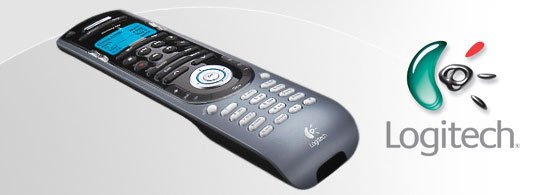

As we utilize more and more electronic devices in the digital home, controlling them becomes an important issue. No one wants to keep up with or sort through a dozen different remotes for various devices in a home entertainment system and surrounding electronic equipment. The Logitech Harmony Universal Remote Control is the perfect solution. After reviewing numerous different remote control options and actually using Logitech Harmony remote controls for years, I can whole-heartedly recommend the Logitech Harmony remote control to anyone seeking a solution. I prefer the 880 model’s buttons and additional display items, while others prefer the touch-screen and interface upgrades of the Harmony One. However, both remotes use the same intelligent system, making either an excellent choice.
Both models support 15 or more devices. The device database is extensive, and is perfect if you have lost a remote control or have a damaged remote. Otherwise, you can also program a device from an existing remote control. The setup wizards are intuitive and enable easy setup of devices.
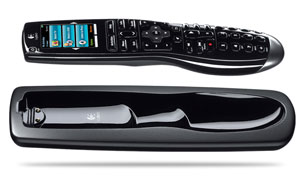 One-touch operation is provided for operation, including turning on a device and any other component(s) that may be required to use it (such as turning on a TV also when playing a DVD). Buttons can be customized for specific tasks. Backlighting is provided for the buttons as well as the LCD display. The remotes are also rechargeable via the charging station, with low battery notification available when in use.
The device compatibility for the Harmony remotes is incredible. You can control a televisions, satellite or cable box, DVD player, video recorder, digital media player, TiVo or other PVR, game console, amplifier, stereo, or even a PC or home automation setup. More than 5,000 brands and 225,000 devices are supported.
That’s a cool gadget. I will definitely love to buy it. Thanks for the info. 🙂
Good post. I’m looking to get me one of these!
Thanks for the great information.
This remote is a super star product!
I have had the latest models of harmony remotes and they are to die for! moat remotes inquire resultes this remote gives you resultes
Do not waste your money, the control logic and the database of devices is not complete, we could not get the devices to power on properly and/or set themselves. We had to manually set all of the buttons and many did not work once we left the program learning mode. 175,000 devices in database NOT! Not complete and time consuming. Had to return it…PS the XBOX 360 Model works for the XBOX but is really no more than a glorified and expensive version of the Microsoft remote, it works well.
These are kinda expensive. The harmony one is around $175, and the 880 is about $90. I got a refurbished 520 for $40 on eBay, and it does everything the higher-end models, except without a touch-screen or recharging base. As for the remote’s functionality, its amazing. If you like tweaking your electronic devices, you’ll have a ball with these remotes. If you don’t like to tweak, there are plenty of automatic options, especially the “activities,” that will make this a good investment.
If it’s not too expensive and difficult to program this could be my answer
I have purchased two different Logitech remotes, and spent a considerably sum having them both installed. I also have a good friend that purchased their high end remote. Universally, they are HORRIBLE. They are buggy, and must constantly be reset. I discussed it with Best Buy, and they reported that they would never suggest anyone buy one, as they get complaints from virtually everyone who purchases them. Now what do I do? I guess I eat the install cost and try another manufacturer.
I have the 550 model and I love it. The only drawback are the buttons are a little small (which appears to be corrected above), and it works for everythign but my PS3 since that’s bluetooth and not infared like all my other remotes.
I hate this product. Everytime I touch a button the water in my pool floods my house.
Good review of a great remote control.
UK based readers might want to be aware that there are no coloured ‘fastext’ buttons which are essential for Sky+ and you’ll have to use the ones that appear on the touchscreen instead, which can be a little annoying.
We have Cox cable with DVR capabiliity, a new Sharp AQUOS tv, Yamaha sound system, Sony Blu-Ray, and a Zenith DVD/VCR.
Does anyone who has tried this know if it works well with COX cable abd the other items we have?
I changed the battery and I get the message,Safe Mode,but will not let me operate the remote.WHAT DO i DO?
I have a magnavox tv that will not turn on by the button and i don’t have the orig remote, will a universal remote work to turn the tv on
I have a Logitech Universal remote just like the one shown above with the tray and it has been screwing up really bad lately. I cannot do anything with one touch at times. I have to turn on the components one at a time and turn them off the same way. I really like the remote too. Does anyone know how to get this thing to work properly again?