
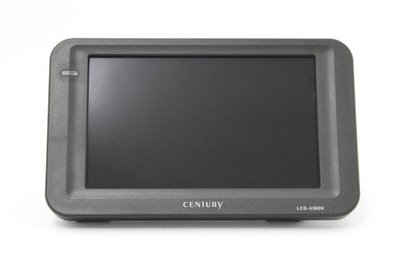
Century Japan has released a handy 4.3" USB LCD monitor. The unit is designed as a secondary display with the extra functionality of a stand-alone photo frame. Imagine you’ve been hard at work all day, but you’re expecting a specific email or IM. You’re tired, and want to go sit in the recliner you have in the room. Rather than having to pop up to your desk every time you hear your email/IM notification sound, just look over at the small LCD display sitting beside you. That’s just one example of possibilities the monitor can offer. The WVGA 800 x 480 display does not require a power supply because it is powered by the USB bus (one less cable). Its brightness is rated at 200 cd/m3, and it uses LED backlighting. The Century Japan LCD will be available for purchase in mid-November for about $199.

Popularity: 1% [?]
Subscribe to the RSS:


Everything just seems to be getting smaller and smaller. This looks great.
October 14th, 2008 at 10:20 am
Nice, would work great for a monitor in a carPuter.
October 20th, 2008 at 4:53 pm
Yup, says it all, that the world is shrinking.
October 20th, 2008 at 6:39 pm
[...] more information the USB Monitor and Photo Frame, please visit the Gadget Advisor technology [...]
January 19th, 2009 at 3:28 am
[...] more information the USB Monitor and Photo Frame, please visit the Gadget Advisor technology [...]
January 19th, 2009 at 3:53 am
[...] more information the USB Monitor and Photo Frame, please visit the Gadget Advisor technology [...]
January 19th, 2009 at 3:55 am
[...] more information the USB Monitor and Photo Frame, please visit the Gadget Advisor technology [...]
January 19th, 2009 at 3:59 am
[...] more information the USB Monitor and Photo Frame, please visit the Gadget Advisor technology [...]
January 19th, 2009 at 4:02 am
[...] more information the USB Monitor and Photo Frame, please visit the Gadget Advisor technology [...]
January 19th, 2009 at 4:03 am
[...] more information the USB Monitor and Photo Frame, please visit the Gadget Advisor technology [...]
January 19th, 2009 at 4:04 am
[...] more information the USB Monitor and Photo Frame, please visit the Gadget Advisor technology [...]
January 19th, 2009 at 4:05 am
[...] more information the USB Monitor and Photo Frame, please visit the Gadget Advisor technology [...]
January 19th, 2009 at 4:06 am
[...] more information the USB Monitor and Photo Frame, please visit the Gadget Advisor technology [...]
January 19th, 2009 at 4:08 am
[...] more information the USB Monitor and Photo Frame, please visit the Gadget Advisor technology [...]
January 19th, 2009 at 4:09 am
[...] more information the USB Monitor and Photo Frame, please visit the Gadget Advisor technology [...]
January 19th, 2009 at 4:10 am
[...] more information the USB Monitor and Photo Frame, please visit the Gadget Advisor technology [...]
January 19th, 2009 at 4:12 am
[...] more information the USB Monitor and Photo Frame, please visit the Gadget Advisor technology [...]
January 19th, 2009 at 4:13 am
[...] more information the USB Monitor and Photo Frame, please visit the Gadget Advisor technology [...]
January 19th, 2009 at 4:14 am
[...] one off the shelves, since it’s reasonably priced at around $200. For more information the USB Monitor and Photo Frame, please visit the Gadget Advisor technology [...]
December 18th, 2009 at 11:43 pm
[...] more information the USB Monitor and Photo Frame, please visit the Gadget Advisor technology [...]
January 19th, 2010 at 5:22 am
[...] more information the USB Monitor and Photo Frame, please visit the Gadget Advisor technology blog. Related Posts:LCD Monitor V/s Crt MonitorShould [...]
March 25th, 2010 at 3:24 am
[...] more information the USB Monitor and Photo Frame, please visit the Gadget Advisor technology [...]
April 27th, 2010 at 8:48 pm
[...] more information the USB Monitor and Photo Frame, please visit the Gadget Advisor technology [...]
May 13th, 2010 at 7:59 pm
[...] more information the USB Monitor and Photo Frame, please visit the Gadget Advisor technology [...]
June 6th, 2010 at 5:47 am
[...] more information the USB Monitor and Photo Frame, please visit the Gadget Advisor technology blog. Share and Enjoy in Parkzone Corsair [...]
July 28th, 2010 at 6:58 am
[...] more information the USB Monitor and Photo Frame, please visit the Gadget Advisor technology [...]
August 13th, 2010 at 11:18 pm
[...] more information the USB Monitor and Photo Frame, please visit the Gadget Advisor technology [...]
August 22nd, 2010 at 5:42 am
[...] more information the USB Monitor and Photo Frame, please visit the Gadget Advisor technology [...]
August 31st, 2010 at 11:08 am
[...] more information the USB Monitor and Photo Frame, please visit the Gadget Advisor technology [...]
October 3rd, 2010 at 11:31 am
[...] more information the USB Monitor and Photo Frame, please visit the Gadget Advisor technology blog. Filed Under DVD Headrest Tips Tagged With [...]
February 14th, 2011 at 7:14 am