
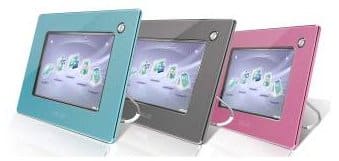
Displaylink USB video technology introduced the possibility of secondary USB monitors to the technology community. ASUS has now successfully extended this technology to create a unique product, the ASUS UFOTO, which combines the functionality of a photo frame and a secondary monitor. It is a 7" monitor that allows a high resolution display of up to 800×400 pixels (720×480 viewing area).
It serves very well as a photo frame because as a standalone gadget, it is able to store over 700 photos with its in-built 128MB memory. The product features auto image rotation for vertical or horizontal placement. If the in-built memory is not enough, adding additional storage devices is also possible. The UFOTO supports CF/FD/MMC/MS/xD cards and an external USB flash drive. It can be plugged into an AC power source, or it can operate on its own, drawing power from its in-built rechargeable battery. It even allows photo searching by specific dates. Several popular image formats are supported, including JPG (the most common), BMP, and GIF.
The UFOTO looks very elegant sitting on a desk or hanging on a wall. Left on its own, it is able to display a huge number of photos in a slideshow. To make the slideshow more interesting, it is also possible to play MP3 while the slideshow is displaying.
Similar to full-size LCD monitors, the UFOTO is also capable of adjusting its brightness according to the surrounding ambiance automatically. For example, when the surrounding light dims, the display adjusts itself until a comfortable level is attained. This is to ensure that the photos are always displayed in the best possible light.
The other primary function that the UFOTO serves is as a secondary LCD monitor. When plugged into the USB port of a desktop computer, the display can be synchronized to either look exactly like the parent monitor or display a totally different application altogether. This is useful for being able to see your screen from another location or running multiple applications concurrently without cluttering up monitor space.
For those who are concerned about the design of the unit, the ASUS UFOTO comes in three cool colors: star silver, blush pink, and sky blue. It has a shiny exterior casing, which makes the appearance highly compatible with Apple desktops and laptops.
Finally, note that the ASUS UFOTO is designed to be a simple piece of hardware. As the USB video technology is still in its infancy, do not expect the UFOTO to be able to display advanced 3D graphics. However, the technology at its current stage is ideal for displaying photos, playing music, or even watching videos. Available at a mere 06kg, the UFOTO is perhaps the smallest monitor around with this much functionality.
Popularity: 2% [?]
Subscribe to the RSS:


[...] more information on USB LCD monitors and USB Touch Screen LCD monitors, please visit the Gadget Advisor technology [...]
December 26th, 2008 at 3:25 am
[...] more information on USB LCD monitors and USB Touch Screen LCD monitors, please [...]
January 26th, 2009 at 11:05 pm
[...] within the range of $150 to $400 – a small price to pay for a cool gadget. For more information on USB LCD monitors and USB Touch Screen LCD monitors, please visit the Gadget Advisor technology blog.Free [...]
April 19th, 2009 at 6:11 pm
[...] more information on the Media Port UP300x and the ASUS UFOTO UF735, please visit the Gadget Advisor [...]
September 17th, 2009 at 1:46 pm
[...] some-more report upon a Media Port UP300x as well as a ASUS UFOTO UF735, greatfully revisit a Gadget Advisor blog. Share and [...]
September 24th, 2009 at 3:33 pm
[...] more information on the Media Port UP300x and the ASUS UFOTO UF735, please visit the Gadget Advisor [...]
September 28th, 2009 at 2:01 pm
[...] more information on the Media Port UP300x and the ASUS UFOTO UF735, please visit the Gadget Advisor [...]
October 11th, 2009 at 7:16 pm
[...] more information on the Media Port UP300x and the ASUS UFOTO UF735, please visit the Gadget Advisor blog. Liked this post? leave a comment! Posted to » [...]
November 6th, 2009 at 9:06 am
[...] more information on USB LCD monitors and USB Touch Screen LCD monitors, please visit the Gadget Advisor technology [...]
November 27th, 2009 at 6:10 am
[...] the range of $150 to $400 – a small price to pay for a cool gadget. For more information on USB LCD monitors and USB Touch Screen LCD monitors, please visit the Gadget Advisor technology [...]
December 18th, 2009 at 12:27 pm
[...] more information on the Media Port UP300x and the ASUS UFOTO UF735, please visit the Gadget Advisor [...]
December 27th, 2009 at 10:25 am
[...] more information on the Media Port UP300x and the ASUS UFOTO UF735, please visit the Gadget Advisor [...]
January 19th, 2010 at 10:11 am
[...] more information on the Media Port UP300x and the ASUS UFOTO UF735, please visit the Gadget Advisor [...]
January 24th, 2010 at 1:56 am
[...] more information on the Media Port UP300x and the ASUS UFOTO UF735, please visit the Gadget Advisor [...]
January 24th, 2010 at 9:51 am
[...] more information on the Media Port UP300x and the ASUS UFOTO UF735, please visit the Gadget Advisor blog. « San Diego, Orange County [...]
January 25th, 2010 at 12:36 am
[...] more information on USB LCD monitors and USB Touch Screen LCD monitors, please visit the Gadget Advisor technology blog. [...]
March 12th, 2010 at 5:16 am
[...] never be the same again with these devices.For more information on the Media Port UP300x and the ASUS UFOTO UF735, please visit the Gadget Advisor blog. Featured Topics: External Storage [...]
March 23rd, 2010 at 9:08 am
[...] more information on USB LCD monitors and USB Touch Screen LCD monitors, please visit the Gadget Advisor technology [...]
March 24th, 2010 at 6:38 pm
[...] more information on the Media Port UP300x and the ASUS UFOTO UF735, please visit the Gadget Advisor [...]
April 1st, 2010 at 5:39 pm
[...] more information on the Media Port UP300x and the ASUS UFOTO UF735, please visit the Gadget Advisor [...]
April 24th, 2010 at 12:13 am
[...] more information on the Media Port UP300x and the ASUS UFOTO UF735, please visit the Gadget Advisor blog. var a2a_config = a2a_config || {}; [...]
May 10th, 2010 at 11:09 pm
[...] more aggregation on the Media Port UP300x and the ASUS UFOTO UF735, gratify meet the Gadget Advisor blog. Share and [...]
May 15th, 2010 at 4:37 pm
[...] more information on the Media Port UP300x and the ASUS UFOTO UF735, please visit the Gadget Advisor blog. var a2a_config = a2a_config || {}; [...]
May 19th, 2010 at 12:40 pm
[...] more information on the Media Port UP300x and the ASUS UFOTO UF735, please visit the Gadget Advisor blog. This entry was posted on Saturday, June 5th, 2010 at [...]
June 5th, 2010 at 9:22 am
[...] more information on the Media Port UP300x and the ASUS UFOTO UF735, please visit the Gadget Advisor [...]
June 5th, 2010 at 12:07 pm
[...] more information on the Media Port UP300x and the ASUS UFOTO UF735, please visit the Gadget Advisor blog. Share and [...]
June 12th, 2010 at 8:08 am
[...] more information on the Media Port UP300x and the ASUS UFOTO UF735, please visit the Gadget Advisor blog. Share and [...]
June 14th, 2010 at 5:41 am
[...] more information on the Media Port UP300x and the ASUS UFOTO UF735, please visit the Gadget Advisor blog. Share and [...]
June 17th, 2010 at 3:35 am
[...] some-more report upon a Media Port UP300x as well as a ASUS UFOTO UF735, greatfully revisit a Gadget Advisor [...]
June 21st, 2010 at 9:28 am
could it be possible to give a price interval??
June 28th, 2010 at 9:37 am
[...] more information on the Media Port UP300x and the ASUS UFOTO UF735, please visit the Gadget Advisor [...]
July 3rd, 2010 at 10:33 pm
[...] more information on the Media Port UP300x and the ASUS UFOTO UF735, please visit the Gadget Advisor blog. Share | Posted in Gadgets Tags: [...]
July 8th, 2010 at 1:08 am
[...] more information on USB LCD monitors and USB Touch Screen LCD monitors, please visit the Gadget Advisor technology [...]
July 11th, 2010 at 8:22 pm
[...] more information on the Media Port UP300x and the ASUS UFOTO UF735, please visit the Gadget Advisor blog. Filed Under: Gadgets Tagged With: Asus, Consideration, [...]
July 20th, 2010 at 8:13 pm
[...] more information on the Media Port UP300x and the ASUS UFOTO UF735, please visit the Gadget Advisor blog. Share and [...]
July 26th, 2010 at 10:26 am
[...] more information on USB LCD monitors and USB Touch Screen LCD monitors, please visit the Gadget Advisor technology blog. [...]
July 31st, 2010 at 12:54 pm
[...] more information on the Media Port UP300x and the ASUS UFOTO UF735, please visit the Gadget Advisor [...]
August 1st, 2010 at 11:25 am
[...] more information on the Media Port UP300x and the ASUS UFOTO UF735, please visit the Gadget Advisor [...]
August 1st, 2010 at 9:47 pm
[...] more information on the Media Port UP300x and the ASUS UFOTO UF735, please visit the Gadget Advisor [...]
August 23rd, 2010 at 10:10 pm
[...] more information on the Media Port UP300x and the ASUS UFOTO UF735, please visit the Gadget Advisor [...]
August 26th, 2010 at 9:02 am
[...] more information on the Media Port UP300x and the ASUS UFOTO UF735, please visit the Gadget Advisor blog. UncategorizedConsideration, Exciting, Gadgets, [...]
September 13th, 2010 at 11:17 am
[...] more information on the Media Port UP300x and the ASUS UFOTO UF735, please visit the Gadget Advisor [...]
September 23rd, 2010 at 8:16 pm
[...] more information on the Media Port UP300x and the ASUS UFOTO UF735, please visit the Gadget Advisor blog. // Related Posts:Gadgets That Can Make Students More [...]
September 24th, 2010 at 9:23 pm
[...] more information on the Media Port UP300x and the ASUS UFOTO UF735, please visit the Gadget Advisor [...]
October 25th, 2010 at 12:37 am
[...] more information on USB LCD monitors and USB Touch Screen LCD monitors, please visit the Gadget Advisor technology [...]
November 29th, 2010 at 1:04 am
[...] Aroah is an active blogger and has an active history with relevance to HDPC Smartphone, ASUS P6T Motherboard Review and ASUS USB Monitor. [...]
December 18th, 2010 at 8:15 pm
[...] more information on USB LCD monitors and USB Touch Screen LCD monitors, please visit the Gadget Advisor technology blog. [...]
December 21st, 2010 at 3:01 pm
[...] the range of $150 to $400 – a small price to pay for a cool gadget. For more information on USB LCD monitors and USB Touch Screen LCD monitors, please visit the Gadget Advisor technology [...]
January 30th, 2011 at 2:13 am
[...] more information on USB LCD monitors and USB Touch Screen LCD monitors, please visit the Gadget Advisor technology blog. [...]
February 1st, 2011 at 5:01 pm
[...] more information on USB LCD monitors and USB Touch Screen LCD monitors, please visit the Gadget Advisor technology [...]
February 14th, 2011 at 2:30 am